Clipboard manager for Windows

ClipShelf: Clipboard Manager & Clipboard History for Windows

Never lose what you copied.

ClipShelf is a fast, private clipboard manager for Windows 11 and 10 that saves your clipboard history and lets you paste anything again with one shortcut.

The main download link works on any device; the second opens Microsoft Store on Windows.

ClipShelf clipboard manager for Windows icon
Searchable clipboard history
Paste anywhere with Alt+Shift+V
Private — never saves passwords

Product preview

See ClipShelf in action

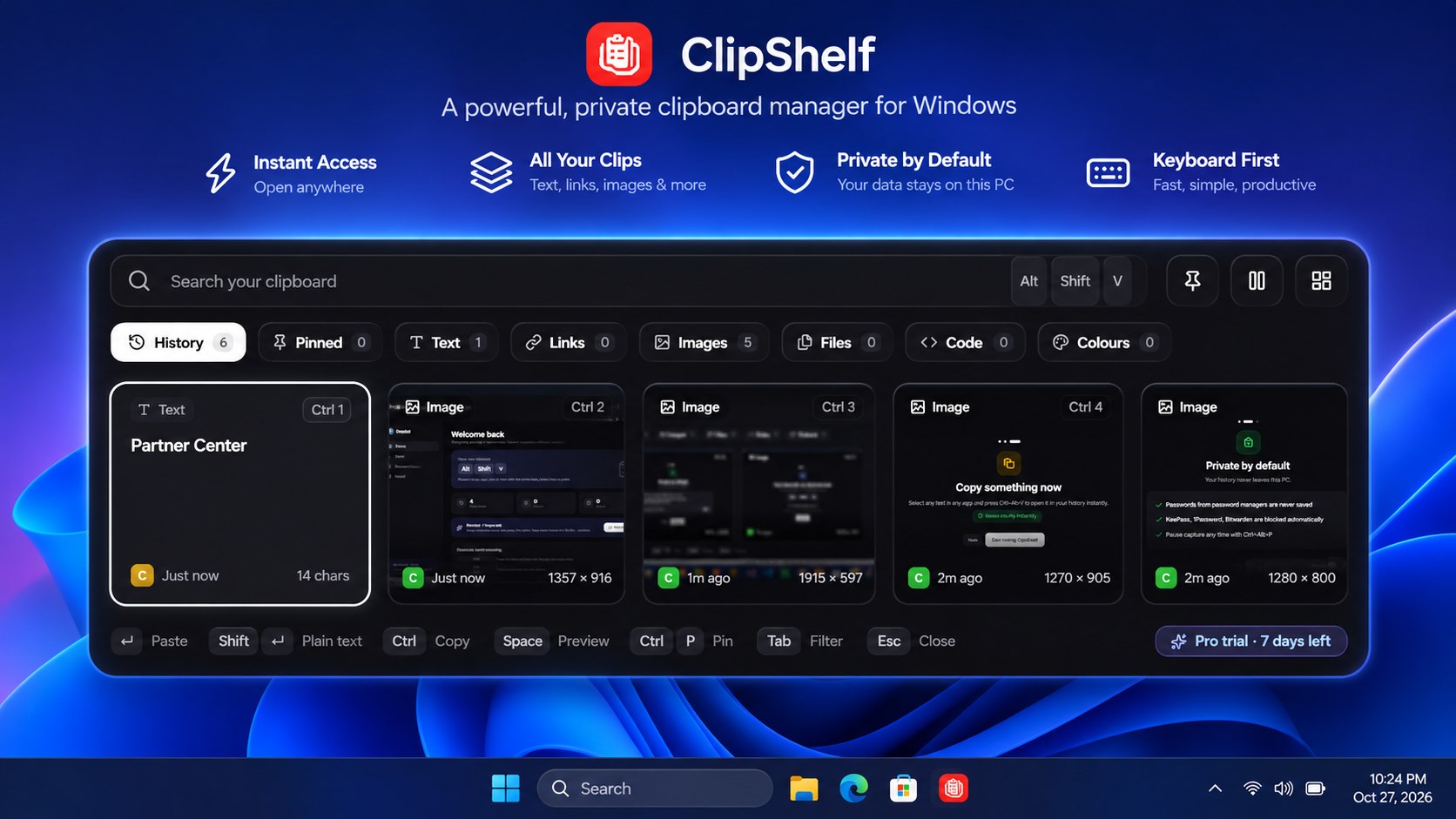
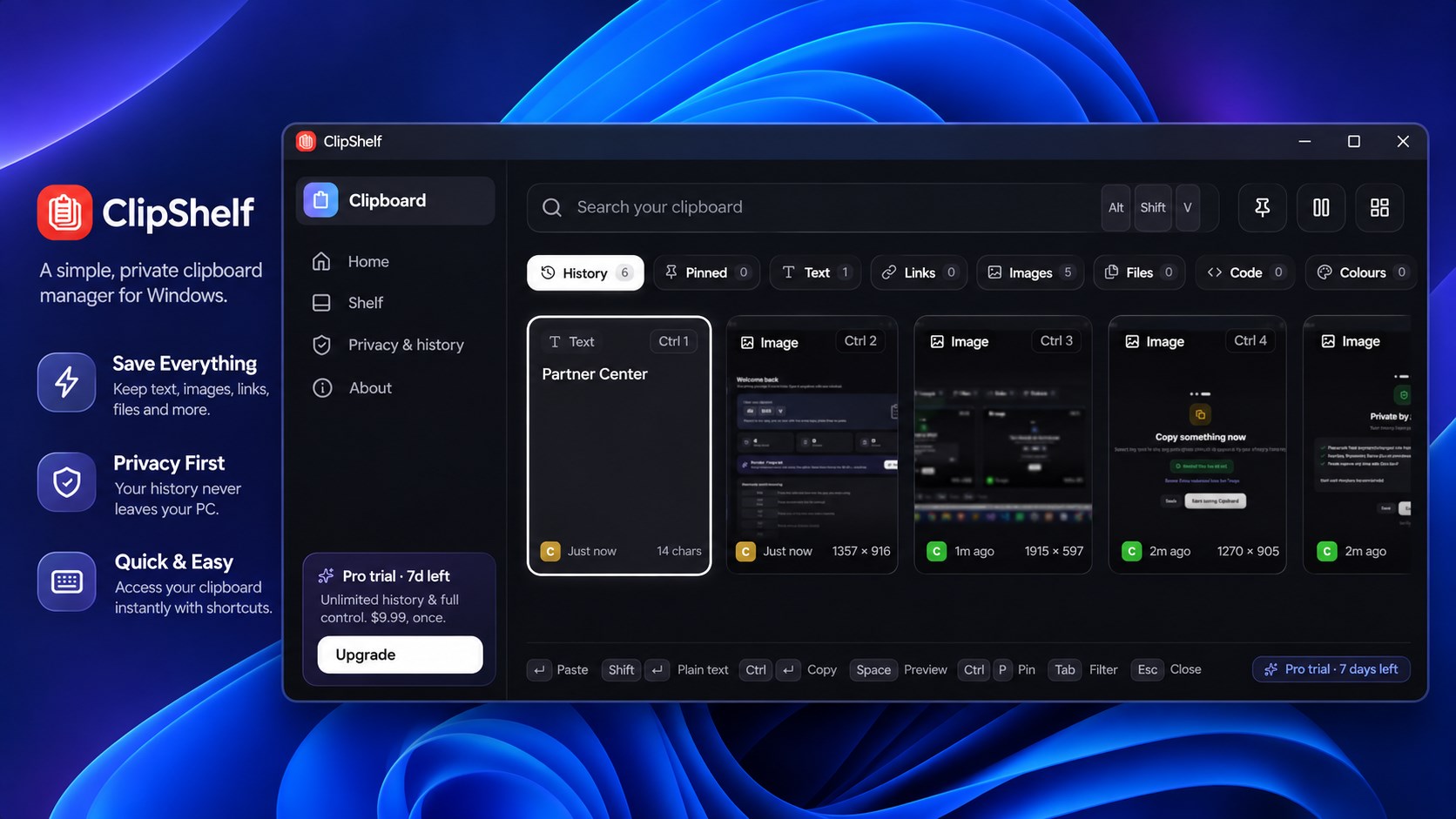
Official Microsoft Store screenshots. Select any image to view it at full size.

What is ClipShelf?

ClipShelf is a fast, private clipboard manager for Windows 11 and Windows 10. Copy text, links, images, files and colors as usual, then press Alt+Shift+V in any app to open your full clipboard history in a clean, modern shelf. Type to search, pick an item with the arrow keys and press Enter to paste it straight into the app you were using.

Why ClipShelf

  • Unlimited clipboard history with Pro — the built-in Windows clipboard keeps only 25 items
  • History survives restarts — what you copied yesterday is still there
  • Instant search across everything you copied
  • Paste into any app with one key — no extra Ctrl+V
  • Private by default — your history never leaves your PC

A smart clipboard

ClipShelf understands what you copy. Links, emails, phone numbers, colors (HEX and RGB), code, file paths and images each get their own card and preview. Copy a color to see the swatch with HEX, RGB and HSL values, copy an image to see a thumbnail, or copy files and paste them again later.

Built for the keyboard

  • Alt+Shift+V – open your clipboard history anywhere
  • Enter – paste the selected item; Shift+Enter – paste as plain text
  • Ctrl+1 to Ctrl+9 – paste one of the first nine items instantly
  • Ctrl+P – pin an item so it never expires
  • Ctrl+Alt+P – pause clipboard capture

Privacy first

  • Passwords copied from password managers are never saved
  • KeePass, KeePassXC, 1Password and Bitwarden are blocked automatically
  • Add any app to your block list
  • No account, no cloud, no ads — everything stays on your device

Free and Pro

ClipShelf is free with clipboard history for the last 200 items or 7 days. Try every Pro feature free for 7 days, no credit card needed. ClipShelf Pro is a one-time purchase — no subscription — with unlimited history, a custom shelf position and size, and all future Pro features.

Questions, answered

ClipShelf FAQ

How do I see my clipboard history on Windows?

Install ClipShelf and press Alt+Shift+V in any app. Your full clipboard history opens; search, pick an item and press Enter to paste it.

Does ClipShelf keep my history after a restart?

Yes. Unlike the built-in Windows clipboard, ClipShelf keeps your history across restarts.

Is ClipShelf safe for passwords?

Yes. Passwords copied from password managers such as 1Password, Bitwarden, KeePass and KeePassXC are never saved, and you can block any app or pause capture.

Is ClipShelf free?

Yes. The free version keeps the last 200 items or 7 days of history. ClipShelf Pro is an optional one-time purchase for unlimited history and extra customization.

Where can I download ClipShelf?

ClipShelf is available for Windows 11 and Windows 10 from the Microsoft Store.

Available on Microsoft Store

Copy freely. Find anything. Paste in a keystroke.